|
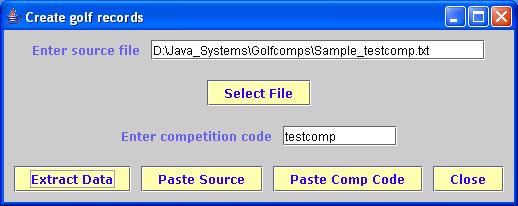
To speed up the creation of a competition, a utility has been provided that will extract data from a text file and put the information into data records for the competition. To start the utility, you need to run the application ExtractData.jar which should be in the directory into which the Golfcomp application was installed. In the example situation, this would be C:\golfcomp Alternatively, you can click the button in the competition code entry screen. Once you have clicked ExtractData.jar you should see the window, as shown to the right, appear on your screen. |
![]() |
The first thing the system needs to know is the location of the text file that contains the data to be extracted. The user can enter the path to the text field in the first input field. Altenatively, they can click on the Select File button and use the file manager utility to locate the file and update the Source File entry. Another option is to cut the file path and click on the Paste Source button which will automatically load the current contents of the paste buffer into the file path field.
The next thing the system needs to know is the competition code by which this competition is to be referenced. This needs to be entered in this field. As above , it is possible to "cut" the Competition name and click on the Paste Comp Code button which will automatically load the current contents of the paste buffer into the Competition name field.
Once the user has entered the above data, they can extract the data by clicking the Extract Data button. The system will then display a message when the extraction is complete
The source file for extraction needs to be in a specific format. Each line of the file will be converted into 1 competition record. Each line can contain upto 7 data elements each seperated by a TAB character. These are normally referred to as TAB delimited files in most spreadsheet applications. The first 4 data fields will be used to fill the 4 data fields that will appear in the columns that are displayed on the results page. The fifth field is the number of strokes received by the player. The sixth value is used in team competions to assign the team code to the player. The seventh value is the player sequence in the team, which is used to determine Yellow Ball competition scores.
Note that each value MUST be in its appropriate position. So if you have only 1 player and you have a Shots received value, the other 3 data fields must be present, i.e. these values need to be blank.
| < Previous | Home |