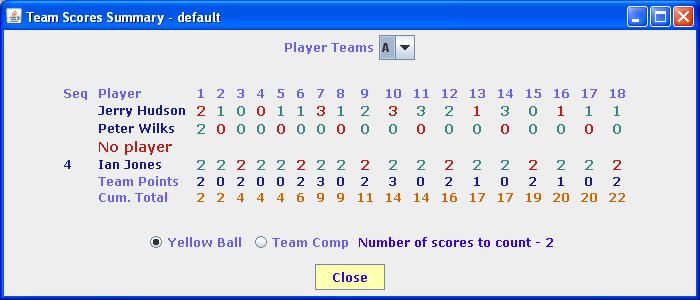
The user can define a team competition based on the scores entered for each individual. The results are based on the best scores in the team for EACH HOLE. The user can specify how many of the players scores for each hole are to be used in the calculation. If the user specifies Number of scores to use as 2, the system will take the best 2 scores for each hole out of the entire team to calculate the team score for that hole.
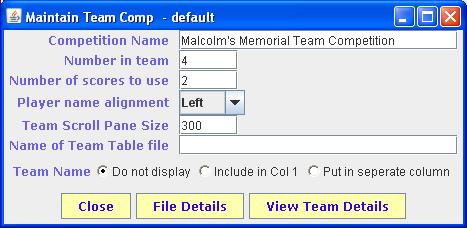
The team competition maintenance window is shown below
The user enters the value that is to be displayed as the title on the Team Competion results page.
The user specifies how many players the system should expect in each team
The user specifies how many of the scores in each team should be used to calculate the team score
The system takes the first display field for each team member record to display in the results page. The user can specify the alignment of the text in the results page by selecting the appropriate value from the drop down box on the right
As with the individual results, the team details are displayed in a window of fixed height. As the amount of space left in the browser to display this Scroll Pane can vary tremendously, this entry allows the user to specify how large the Scroll Pane should be so that as much information as possible can be displayed in the browser.
The user can incorporate team names into the team results display. This part tells the system the name of the file that holds the mapping between team code and team name. This file is held in the Params directory.
The system expects 1 line in the file for each team code. Each line contains 2 elements seperated by a TAB character. The first element contains the team code and the second element contains the team name as the user wants it displayed on the results page.
This file can be created by most spreadsheets. Each row represents a team. First column holds the code and the second holds the team name. If you save the file as tab delimited or as a CSV type file you should get a file in the correct format.
The user has a number of option regarding the display of a team name of the results display page. The user can choose which option they want to use by clicking the appropriate button from those displayed.
The first option is NOT to display the team name at all. The second option is to display the team name as line 1 of the first column of player names. The player's name that would have appeared in that column is displayed on line 2 of that column. The final option is to put the team name in a seperate column which would then be followed by the team players names.
If the user clicks on this option, they will be presented with a display similar to that shown below that gives a hole by hole summary showing the points scored by each player for any selected team.
The user can selected which team they want displayed from the drop down box. This drop down box will contain all the teams that the system can find for the competition.
The user can also select whether the summary is to be formatted for a Yellow Ball competiton or the standard Team Comp by clicking on the appropriate radio button.