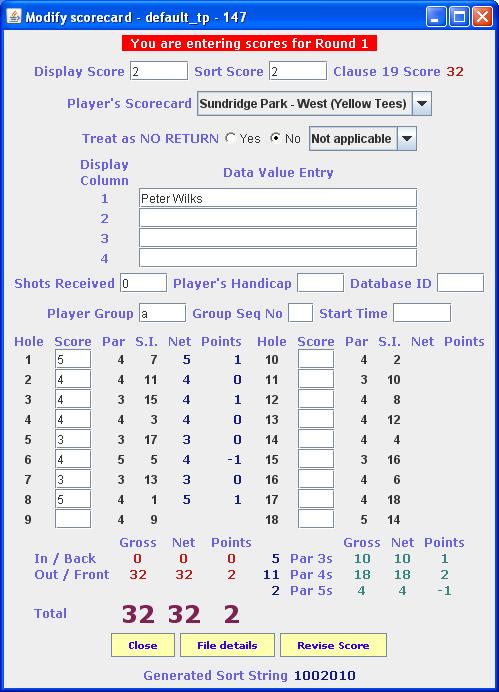
The scorecard maintenance window is shown below
The user enters the value that is to be displayed as the score on the results page for this scorecard. The value can be anything e.g. 37, Won, First.
If the user has selected User Defined as the value to use for sorting the results, then the system will use the value entered here for sorting. If no value has been entered for this field when the record is filed, the system will check the entry for Display Score. If this value is numeric, it will be copied to Sort Score.
The system can deal with competitions where more than 1 scorecard is used. This could be where men and women are playing in the same competition or the competition is being played on more than 1 course.
The system will automatically default the scorecard to the one selected in the main competition maintenance screen and use that for calculating the player's score. If a different scorecard was used by the player, the user can select this from the drop down box
The user enters the value that will appear in each column of the results page in these fields
The user enters the Shots Received value. This is the value that is used to calculate the net score for this entry if the user enters the scores for the holes
This field should only be used if the user has defined a team competition. If they have, the user enters a value here that will be used to group the players together into their respective teams. The value can be anything such as a number or a letter.
This will indicate the sequence in the team that the player's score should be presented when displaying the scores in the team summary option. At the moment this information is only used for the summary screen and is not used for any of the points calculations.
The user is taken through the holes one by one. For each hole, they enter the strokes taken. Values from 0 to 9 and a blank entry are permitted. The system will not proceed until a valid entry has been accepted. The system will generate an error message if it encounters a problem.
Note that the system automatically moves to the next field when a valid entry has been entered, ie no carriage return is necessary.
If the user clicks on this button, it will close the window and terminate the application
If the user clicks on this button, the scorecard details will be written to file, the window will close and the user will be returned to the previous window where this window was invoked.