Setup
This system is written in Java and uses "JAR" files to execute the
applications. You must have Java installed on your system and your file manager must have the
appropriate action associated with this type of file. This is usually the case with Windows XP.
The system requires the Java Runtime installed. Currently the system has been compiled using version 7 update 7.
This means that you require version Java JRE version 1.7 and above for the system to operate properly.
To install the system, unzip the file golfcomps.zip to a directory of your choice.
For the purposes of this documentation, we will unzip the files to the directory
C:\
|
After unzipping the file, there will be a sub-directory called golfcomps in the directory
C:\. The path to this directory is
C:\golfcomp. In this sub-directory is an item called
SetPath.jar. If you double click this item it should set the
default data path for the system
to the directory in which you clicked the item.
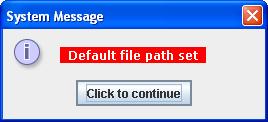
Once you have clicked SetPath.jar
the system will confirm that the
update is completed by displaying
the message shown on the right.
|
 |
After setting the default path, the software can be run by clicking on the item
golfcomp.jar.